


Configuring Failover and Load Balancing on pfSense: A Practical Guide
Introduction to pfSense: What It Is and Its Advantages
pfSense is an open-source firewall and routing solution known for its flexibility and robustness. The platform is widely adopted by small and medium-sized businesses, as well as by religious institutions, including evangelical churches, that want effective management of their data security and internet connection. pfSense offers a comprehensive set of features that not only protect networks but also optimize performance through load balancing and failover.
One of pfSense’s main advantages is its ability to protect sensitive data. With cyber threats on the rise, safe browsing has become a priority for many organizations. With its advanced firewall, pfSense can monitor and control network traffic, blocking unauthorized access and keeping confidential information secure. The solution also supports VPNs (virtual private networks), providing secure connections for remote work.
Another key feature of pfSense is how efficiently it manages multiple internet links. By implementing failover and load balancing strategies, companies can ensure a stable, fast internet connection, which is essential for business continuity. Load balancing distributes network traffic evenly across different connections, avoiding congestion and improving the user experience. At the same time, failover ensures that if one connection fails, another link is automatically activated, preventing unwanted interruptions.
pfSense is therefore a viable, powerful solution for anyone seeking digital security and optimized internet use, cementing its key role in many organizations.
Benefits of pfSense for Businesses and Religious Institutions
pfSense is a highly effective solution for businesses and religious institutions that want to optimize network security and keep their daily operations running continuously. One of pfSense’s main advantages is its ability to protect sensitive data, which is often stored in business and religious environments. Through advanced firewall and VPN features, pfSense creates a robust shield against cyber threats, ensuring critical information stays protected from unauthorized access.
Beyond security, pfSense also enables efficient management of internet access. Organizations can set clear usage policies, ensuring employees and members of religious institutions access only what’s relevant to their activities. This is particularly useful for minimizing distractions and increasing productivity. pfSense’s access control tools, which include authentication and user management, provide a level of oversight aligned with organizational guidelines.
Bandwidth prioritization is another significant benefit pfSense offers. In environments where internet response time is crucial, such as online meetings or live streams, pfSense can be configured to ensure critical applications get the bandwidth they need. Implementing QoS (Quality of Service) lets organizations decide which applications get priority, ensuring a smoother, more efficient browsing experience. Examples of businesses and religious institutions that have successfully deployed pfSense show how the tool not only improves security but also increases operational efficiency. These benefits make pfSense an advantageous, strategic choice for maintaining network integrity and functionality in many contexts.
Step-by-Step Failover and Load Balancing Configuration on pfSense
To configure failover and load balancing on pfSense, start by accessing the dashboard. Use a web browser and enter the pfSense IP address. After authenticating, you’ll be taken to the main dashboard. The first step is to make sure the network interfaces are properly configured. Go to the Interfaces tab and select the interfaces you’ll use for the internet connection and the internal network. Make sure all interfaces are enabled and have the correct IP settings.
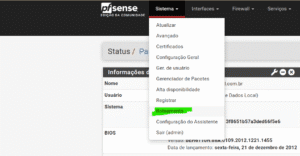
Once the interfaces are configured, move on to the Gateway options. Go to System > Routing > Gateways to add the gateways pfSense will forward traffic to. Set priorities for each gateway, as this lets the system decide which one to use in case of failure. Use the Add Gateway button to add new gateways, and in the settings, define the Monitor IP so pfSense can check connectivity.
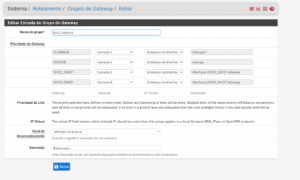
After configuring the gateways, proceed to the load balancing rules in the firewall. Go to Firewall > Rules and click the LAN tab to create a new rule. Firewall rules are essential to let traffic flow properly between interfaces. In the rule settings, choose the gateway group you created earlier so pfSense can distribute traffic between them. Save and apply the changes.
Finally, it’s essential to run tests to make sure the configuration works as expected. Monitor gateway connectivity via Diagnostics > Routing > Gateway Status. Check that failover and load balancing are active by performing controlled disconnections and watching how the system responds. These steps are essential to ensure a robust, resilient network.
Why Choose Alliances to Implement pfSense
Choosing Alliances to implement and install pfSense stands out because of the company’s specialization and experience in this field. The Alliances team has highly skilled professionals who not only master the nuances of pfSense but also understand the particularities of each client’s environment. This combination of technical know-how and focus on each client’s specific needs lets the company deliver solutions that truly meet the expectations and challenges presented.
Customized solutions are another Alliances strength. When starting a project, the team performs a full assessment of the existing infrastructure and the client’s business goals. This ensures pfSense deployments significantly optimize network performance, with failover and load balancing configured for maximum efficiency and security. Alliances professionals always keep up with the latest pfSense trends and updates, ensuring clients have access to the market’s best practices.
In addition, Alliances provides ongoing support after implementation. This commitment to maintaining the infrastructure and resolving any issues gives clients greater peace of mind. One of the most impressive aspects is the testimonials from satisfied clients, who often report how Alliances’ work not only improved the reliability of their networks but also expanded their ability to respond to market demands. This positive experience translates into lasting partnerships, where trust and effectiveness are the foundations of the relationship between Alliances and its clients. Read also: pfSense CE vs. Plus: The Definitive Firewall and Router Guide for Your Network
Frequently Asked Questions
What is failover and load balancing configuration?
Configuring failover and load balancing is an important topic covered in this article. Understand its fundamentals and practical applications.
How do you configure failover and load balancing in practice?
Follow the recommendations in this guide to configure failover and load balancing efficiently and securely.
What are the main benefits of failover and load balancing?
Configuring failover and load balancing brings gains in productivity, security and cost savings.